
INDIA creates new "EPIC"

In the previous blog I posted about the indigeneously made Operating System i.e. BOSS(Bharat Operating System Solutions).

In this blog I wanna bring the browser called "Epic Privacy Browser" to the limelight.
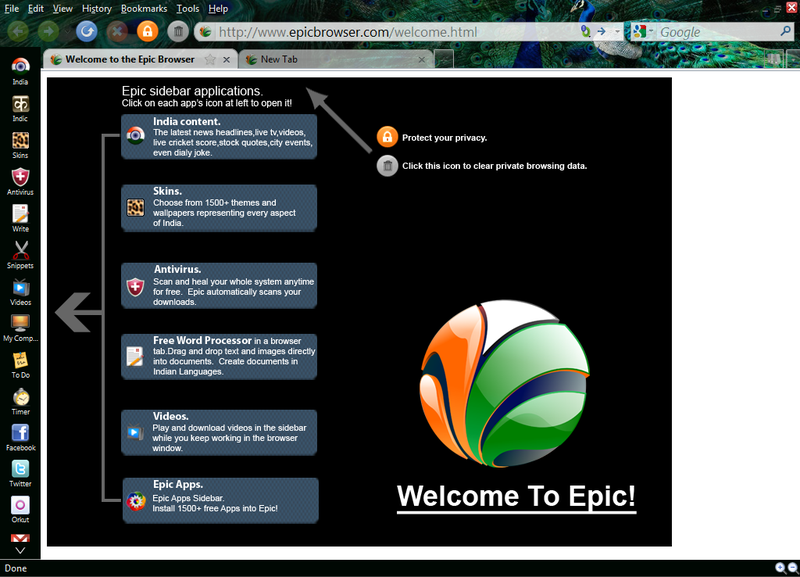


"Security comes first"-The main motto of Epic Privacy Browser.

OLD LOGO

                                                  NEW LOGO

"Epic Privacy Browser "

Let's have a review on this browser.Epic Browser is a web browser by Hidden Reflex and based on Chromium(It's a open source web browser project from which Google Chrome shares the majority of code and features)and is the first web browser of India.
                It was first released on 15 July 2010 and its latest version was released on 29 August 2013. Latest version of Epic Privacy Browser is mainly focused on users privacy online and security.Keeping in mind for our browsing style,browser was based on Mozilla Firefox and is similar to flock means pre-installed widgets such as email facilities,chat,social networking etc.,which is already integrated into it.

Some of its Features:

   
(Left to Right in above pics.)
                        #1. Address Bar and URL Tracking Removed
                       #2. Installation Tracking Removed
                       #3. Error Tracking Removed


Comments

Popular posts from this blog

Indian HAL Tejas | Touch The Sky With Glory | ShotOnNikonD3500

Indian HAL Tejas | Touch The Sky With Glory | ShotOnNikonD3500

installing Laravel v8.0.1 in Windows 10 Pro x64bit

 Using WAMP for  php - 7.4.10 maraiadb - 10 apache - 2.4 php -i | grep -i ssl  to check registration stream socket transports grep -R "search your word" use this cmd to search in linux directory composer diagnose to see the status of composer check with this link also:  https://github.com/composer/composer/issues/4388 Failed to download tijsverkoyen/css-to-inline-styles from dist: The "https://api.github.com/repos/tijsverkoyen/CssToInlineStyles/zipball/b43b05cf43c1b6d849478965062b6ef73e223bb5" file could not be downloaded: php_network_getaddresses: getaddrinfo failed: No such host is known.     failed to open stream: php_network_getaddresses: getaddrinfo  failed: No such host is known.  Now trying to download from source https://github.com/tijsverkoyen/CssToInlineStyles   install the  composer require tijsverkoyen/css-to-inline-styles ======================================================================= These are final steps: ...

Git Commands

  Git commands sorted. Reference: https://git-scm.com/docs Git task Notes Git commands Tell Git who you are Configure the author name and email address to be used with your commits. Note that Git strips some characters (for example trailing periods) from user.name . git config --global user.name "Sam Smith" git config --global user.email sam@example.com Create a new local repository   git init Check out a repository Create a working copy of a local repository: git clone /path/to/repository For a remote server, use: git clone username@host:/path/to/repository Add files Add one or more files to staging (index): git add <filename> git add * Commit Commit changes to head (but not yet to the remote repository): git commit -m "Commit message" Commit any files you've added with git add , and also commit any files you've changed since then: git commit -a Push Send changes to the master branch of your remote repository: git push origin master Status List the...